


ACH for Business Users
To access ACH, you must use your original password (not token and PIN) for your first login. If you forgot your password, you can reset it by clicking Forgot Password on the login page.
User Permissions
If you have permission to initiate ACH transfers in business online banking prior to the upgrade, those permissions will automatically carry over to the new platform.
ACH Payees
All existing ACH payees will automatically migrate to the upgraded platform. No additional action will be required.
ACH History Migration
A detailed history of ACH transactions will not migrate from the current platform to the upgraded platform. After the upgrade is complete, a new transaction history will begin building in the system.
ACH Templates
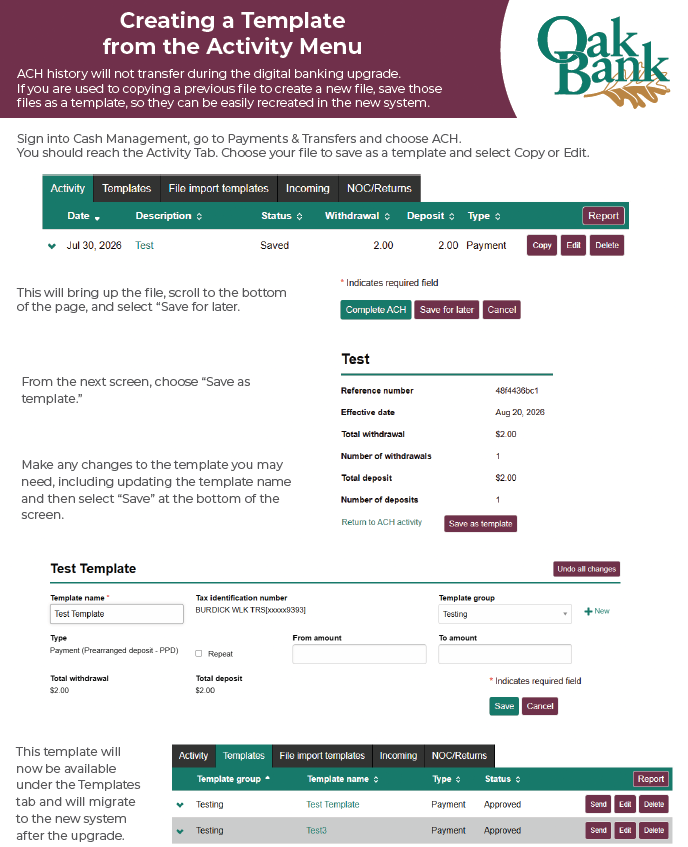
If you have not already done so, create templates for a smoother upgrade transition.
- ACH templates will migrate to the upgraded system. However, once the upgraded experience is live, please review your templates, participants and related accounts before initiating a batch.
- Recurring ACH transfers and/or future-dated ACH payments will not migrate to the upgraded system. Recurring and future ACH payments will need to be reestablished and setup again in the new platform.
- Prior to the upgrade, please create ACH templates for each unique file since the upgraded online banking does not support the Copy feature.
- It is good practice to ensure all of your payee and payment information is stored outside of the digital banking environment.
Click here for instructions on creating a template.

Your Oak Bank team is here to support you at every step of this upgrade. Please review our upgrade materials online. Should you need additional support, consumer clients can call us at 608.250.5554 and business clients can call 608.250.5558.

